











Jan 12, 2026

The landscape of user experience research has undergone a fundamental transformation, moving from a centralized laboratory model to a decentralized, remote-first approach. This evolution is driven by the necessity to reach diverse participants across disparate geographies, thereby reducing the inherent bias found in localized testing. For global product teams, remote research offers a level of scalability and convenience that was previously unattainable. The ability to observe participants in their natural environments reveals authentic behaviors that are often suppressed or altered in an artificial lab setting.
Founders often find that the digital space offers potential for endless creativity, but this potential can only be realized when the design process is grounded in rapid testing and user-centric change. Redbaton, a design and human experience agency founded in 2015, emphasizes that the core of this transformation is the use of research to develop strategies that simplify the complexity of life through design. This approach combines scientific data analysis with artistic design qualities to help companies not only retain their current users but also expand their customer base significantly.
The transition from traditional print-limited design to a digital-first strategy highlights the liberation found in driving change for the user through the UX process. When teams move beyond the limitations of physical location, they can maintain a steady cadence of user contact that keeps the product grounded in reality. This is particularly vital for distributed teams operating across different time zones, where research acts as the connective tissue between strategy and execution.
A primary decision for product leaders is determining when to utilize synchronous interactions versus asynchronous data collection. While synchronous video calls dominated early remote research, the real breakthrough has been the integration of asynchronous methods. These methods—including diary studies, unmoderated usability tests, and video response platforms—allow participants to engage on their own schedule, which often leads to higher data quality as they are not “performing” for a live observer.
Asynchronous research acts as an underrated superpower for organizations that need to scale insights without increasing the headcount of their research teams. Because researchers are not required to be present for every session, they can review responses carefully rather than making real-time judgments that may be clouded by fatigue or bias. This methodology is ideal for:
Early concept testing across different time zones.
Large-scale usability studies where a high volume of data is required.
Longitudinal studies where user behavior is tracked over several days or weeks.
Despite the efficiency of unmoderated methods, synchronous video calls remain essential for building rapport and exploring complex motivations. Video is preferred over audio calls because it allows researchers to pick up on subtle facial cues—a smile, a frown, or a sigh—that provide deep qualitative context. Active listening techniques, such as paraphrasing and repeating user responses, help ensure that the researcher correctly understands the participant and nudges them to elaborate on their experiences.
| Method Type | Primary Benefits | Best Use Case |
| Synchronous (Live) |
Rapport building; deep-dive “why” questions; team observation. |
Discovery interviews; complex usability testing; stakeholder alignment. |
| Asynchronous (Unmoderated) |
Scalability; convenience; authentic natural behavior. |
A/B testing; quick validation; global demographic reach. |
Technical stability remains a significant factor in remote research success. Researchers are advised to conduct trial runs before live calls and have a “Plan B,” such as a pre-set audio backup, in case video connectivity fails. Protecting participant privacy and being transparent about data usage further builds the trust necessary for users to share candid experiences.
Rapid research is a specialized program designed to address the dearth of research resources in fast-moving tech environments. It provides a repeatable, consistent template for addressing evaluative studies across an organization. This framework is not a methodology in itself but a set of guardrails that streamline planning, execution, and analysis to deliver insights in a fraction of the time required for traditional projects.
A typical rapid research program operates on a 10-to-15-day cycle. The process is highly structured, requiring full team accountability and adherence to strict deadlines.
Setup and Planning (Days 1-3): Researchers review the brief, refine objectives, and begin automated recruitment.
Execution (Days 4-8): Studies are conducted, often in short 30-minute sessions to maintain the timeline.
Synthesis and Reporting (Days 9-10): Analysis is finalized, and findings are presented in a 30-minute synthesis meeting where product tweaks are decided.
The goal of rapid research is often to measure two primary components of the user experience: usability and cognitive load. By quantifying these metrics, teams can prioritize pain points on a scorecard, aiming to move all product tasks into the “high usability, low cognitive load” quadrant.
| Research Type | Suited for Rapid Framework? | Reasoning |
| Usability Testing |
Yes |
Measures task success and friction quickly. |
| Concept Testing |
Yes |
Validates comprehension and preferences between designs. |
| Eye Tracking |
Yes |
Identifies areas of attention or confusion in real-time. |
| Foundational Ethnography |
No |
Requires deep, time-intensive immersion. |
| Diary Studies |
No |
Longitudinal nature contradicts the “rapid” cycle. |
Rapid research helps fill resource gaps, particularly during periods of slower hiring or team restructuring. It allows specialized researchers to focus on foundational studies while providing a platform for designers and product managers to conduct tactical research without sacrificing quality.
The shift from periodic, project-based research to continuous discovery is a hallmark of high-maturity product organizations. Instead of conducting large studies every quarter, leading teams maintain a small, steady cadence of user contact that informs weekly sprint cycles. This approach ensures that insights arrive exactly when decisions are being made, preventing the “research debt” that occurs when findings are delivered too late to influence the product roadmap.
Organizations that embed research into their daily business strategy and operations report significantly better outcomes than those that do not. Research shows a 2.7x improvement in business results, including a 3.6x increase in active users and a 2.8x increase in revenue growth. The demand for this type of research is rising, with 66% of teams seeing an increase in the need for user insights to protect revenue and improve customer retention.
To implement continuous discovery effectively, teams must transition from being “service providers” to “strategic partners.” Researchers should join planning conversations early and offer options and trade-offs rather than waiting for formal intake forms. This integration allows for:
Proactive testing of assumptions before they become code.
Continuous refinement of features based on real-time feedback.
Alignment of research findings with key performance metrics such as trial-to-paid conversion and user activation.
The democratization of research means that designers, product managers, and even marketers are increasingly taking an active role in gathering insights. However, this expansion requires structured support—such as templates, training, and research libraries—to prevent decisions from being made on unreliable or duplicated data.
Artificial Intelligence (AI) has emerged as both a significant opportunity and a new source of complexity for UX research in 2025. The primary value of AI in this field is not in replacing human empathy, but in acting as a force multiplier for data processing and logistical management.
Researchers typically spend up to 40% of their project timeline on logistical “admin tax”—navigating time zones, sending scheduling polls, and manually processing incentives. AI-powered tools are now capable of automating these repetitive, low-judgment tasks, allowing researchers to dedicate more time to the work only humans can do: interpretation and strategic problem-solving.
| AI Capability | Impact on Research Process | Strategic Consideration |
| Transcription Analysis |
Converts hours of raw video into searchable text in minutes. |
Must be reviewed for accuracy and nuanced context. |
| Theme Clustering |
Automatically identifies recurring patterns across sessions. |
Risks missing outlier insights that lead to innovation. |
| Sentiment Analysis |
Real-time assessment of user tone during interviews. |
AI may struggle with sarcasm or cultural nuances. |
| Predictive Modeling |
Suggests which design variations will perform best. |
Only as good as the historical data provided. |
One of the most modern challenges in remote research is the rise of the “generative AI participant.” These are individuals who use tools like ChatGPT to craft perfect responses to screening surveys to gain entry into paid studies. While they look like the ideal participant on paper, they often provide shallow or inauthentic feedback during live sessions, potentially rendering research results useless. Founders must ensure that their recruitment processes include rigorous validation to maintain data integrity.
Decision-makers are advised to use AI as a starting point for analysis rather than the final word. Human researchers bring a contextual understanding of the business and the ability to identify ethical failure modes that automated systems may overlook.
Research only works when the knowledge generated can be trusted, found, and used by the entire organization. Research Operations (ResearchOps) provides the framework to make this possible, moving beyond simple data storage to active insight enablement.
Environment: Selecting the right physical and contextual environment for the research method to maximize validity.
Scope: Defining the breadth, goals, and expected outcomes of each study to keep the team focused.
Recruitment & Admin: Building participant databases, managing incentives, and automating logistics to eliminate the “admin tax”.
Data & Knowledge Management: Creating a knowledge hub for documentation and learning, ensuring easy access for all stakeholders.
People: Investing in the training and skill-building of the UX team and fostering collaboration with stakeholders.
Organizational Context: Aligning research projects with the company’s broader strategic priorities and team culture.
Governance: Ensuring all activities follow ethical guidelines and legal regulations like GDPR.
Tools & Infrastructure: Providing the software stack (e.g., Slack, Jira, Miro) necessary for collaboration and knowledge sharing.
| Maturity Level | Characteristics | Organizational Impact |
| Low Maturity |
Ad-hoc research; insights stored in scattered folders; high admin burden. |
Duplicated work; decisions made on guesswork; high turnover. |
| Mid Maturity |
Repository tools mainstream; standardized templates; some automation. |
Improved findability; research keeps pace with some development cycles. |
| High Maturity |
Research essential to strategy; automated logistics; integrated data silos. |
2.7x better business outcomes; higher revenue growth and retention. |
A critical insight for founders is that “findability” is not the end goal of a research repository. The real value emerges when knowledge flows into planning and day-to-day decision-making forums. Decision-makers should work backward from their key decision moments to understand what information is needed and when, rather than building generic storage systems.
Product strategy often founders because the wrong framework is used to interpret user needs. UX leads and product managers frequently grapple with whether to use Jobs-to-be-Done (JTBD) or User Personas, often mixing them up and leading to misguided strategies.
JTBD is a framework that views products as being “hired” by customers to make progress in a specific circumstance. It shifts the focus from “who” the user is to “why” and “when” they use a product.
Job Story Format: “When [situation], I want to [motivation], so I can [expected outcome]”.
Strength: Timeless; reveals unmet needs in “blue ocean” markets where demographics might mislead (e.g., Airbnb finding that the need for “reliable local stays” transcended age or income).
Personas are archetypes that include demographics, psychographics, and behaviors. They are designed to humanize abstract data and serve as reference points during design and prioritization.
Primary Goal: Represent user diversity and build empathy across cross-functional teams.
Strength: Visual and relatable; excellent for tactical UI/UX design and stakeholder buy-in.
| Aspect | Jobs-to-be-Done (JTBD) | User Personas |
| Primary Goal |
Identify the struggle to complete a job; drive innovation. |
Build empathy; represent user diversity. |
| Type of Insight |
Outcome-based (e.g., “scale team without chaos”). |
Profile-based (e.g., “tech-savvy millennial”). |
| Best Scenario |
Market creation, pivots, and positioning. |
Tactical UX/UI flows and feature specs. |
| Effort |
High; requires deep interviews on product switches. |
Moderate; based on aggregated interviews and analytics. |
For high-growth SaaS products, Redbaton recommends a hybrid approach. JTBD defines the strategic direction (e.g., “hire for seamless scaling”), while personas detail the tactical user flows (e.g., “how Emma the manager interacts with the dashboard”).
As remote work has become the “new normal” in 2025, distributed teams have become the backbone of modern operations, allowing businesses to access global talent and drive continuous innovation. However, managing these teams across different time zones and cultures introduces unique leadership challenges, including communication breakdowns and productivity dips.
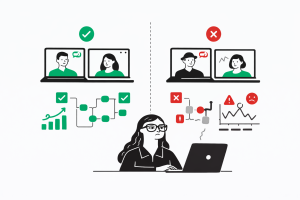
For a CTO or founder, successful distributed leadership depends on balancing autonomy with alignment. Instead of “clock-watching,” leaders must focus on clear outcomes and performance metrics. Key best practices include:
Timezone-Smart Workflows: Ensuring sufficient overlap for delivery and using asynchronous tools (Slack, Jira, Notion) to bridge the gaps when teams are offline.
Default to Documentation: Making decisions, sprint goals, and blockers transparent in shared spaces to avoid information silos.
Cultural Alignment: Educating the team about diverse communication styles and celebrating cultural holidays to make all members feel valued.
| Leadership Red Flag | Indicator of Failure | Strategic Fix |
| Silos in Private Chats |
Team collaboration breaks down; remote workers feel isolated. |
Default to public channels; publish all meeting notes. |
| Falling Velocity |
Missed sprints and delayed project updates. |
Track delivery metrics, not hours; improve async accountability. |
| Too Many Video Calls |
Meetings are used to compensate for unclear processes. |
Rotate duties; set clear async norms; protect downtime. |
Distributed teams that are well-managed unlock immense resilience and speed. Redbaton’s methodology centers on being a “turnkey project partner” for brands seeking innovation, delivering on time by maintaining a methodical and structured workflow that respects these distributed dynamics.
The pressure to “ship faster and spend less” often leads teams to cut corners in user research, which inevitably results in misleading insights and wasted resources. Decision-makers must actively guard against these common bad practices:
Starting research without knowing exactly what needs to be learned is the most frequent mistake in the industry. Without specific, actionable goals, the collected data becomes scattered and irrelevant, leading to misaligned business efforts.
Recruiting “convenience” participants—such as coworkers, friends, or individuals who do not mirror real customers—is a critical failure point. Even a small number of well-chosen participants who match the target persona provide more reliable insights than a large group of irrelevant ones.
Asking “How amazing did you find our service?” or “How satisfied are you with the speed and design?” prevents researchers from gathering sincere feedback. Open-ended, impartial questions are required to allow participants to describe their experiences in their own words.
Depending solely on one method—such as surveys or NPS scores—risks missing critical insights. For example, a high NPS score might reflect a lack of alternatives rather than true customer satisfaction. A better strategy involves combining multiple methods, such as using analytics to identify what is happening and usability testing to explain why.
Treating research as a “check-the-box” activity and rushing the synthesis leads to superficial insights. Proper analysis requires reviewing outcomes objectively rather than trying to confirm existing assumptions.
| Bad Practice | Potential Consequence |
| Leading Questions |
Skewed data that confirms internal bias rather than user reality. |
| Ignoring Detractors |
Missing the most significant opportunities for product improvement and churn reduction. |
| Jargon in Surveys |
Confusing users and collecting unreliable or non-actionable data. |
| Researching Too Late |
Unexpected changes required throughout deployment, leading to long-term costs. |
Founders should remember that quality over speed is often a mutually agreed trade-off that yields higher ROI in the long run. Proactive research—done before and during the design phase—prevents the accumulation of “UX debt” that can cripple a product post-launch.
Evidence of the impact of structured research and design strategy is found in the real-world performance improvements of businesses that prioritize these processes. Redbaton’s commitment to high-quality, research-backed design has led to significant measurable outcomes for diverse clients.
A business management company engaged Redbaton to redesign nine WordPress and PHP websites. By conducting discovery sessions and focusing on improved user flows, the team achieved a 30% improvement in on-page time and a significant boost in overall performance. This outcome highlights the value of understanding the product and visitors before entering the design phase.
For an airline company, Redbaton revamped the user flow from sign-up to payment in one-week sprints. The project resulted in:
A social media engagement rate that quadrupled (4x).
A sign-up rate that exceeded the benchmark by 5x.
An ideal flow condensed into less than three pages to minimize friction and maximize conversion.
These results demonstrate that a methodical, structured approach to UX and branding can turn complex business challenges into intuitive, high-converting digital experiences.
What are the primary challenges of remote UX research in 2025?
Common challenges include technical glitches, difficulty interpreting non-verbal cues over video, time zone management, and the risk of recruiting “fake” participants who use AI to bypass screeners.
How do I choose between synchronous and asynchronous research?
Synchronous research is best for building rapport and deep-dive discovery. Asynchronous research is superior for scalability, reaching global participants, and observing authentic behavior in a natural environment.
How many participants are needed for a typical usability test?
In agile environments, running 30-minute usability tests with as few as five well-chosen participants can uncover significant usability issues and lead to measurable improvements in satisfaction.
What is the “admin tax” in UX research?
The admin tax refers to the 40% of project time researchers spend on logistics like scheduling, participant screening, and incentive distribution. Automating these tasks with AI is a key trend for 2025.
When should I use Jobs-to-be-Done instead of Personas?
Use JTBD for high-level strategy, product discovery, and understanding why users switch from competitors. Use Personas for tactical execution, UI design, and aligning internal teams around user archetypes.
What metrics should I track to measure research impact?
Focus on tying research outcomes to business metrics like trial-to-paid conversion, activation rates, support ticket reduction, and overall revenue growth.
How can I ensure my remote research stays on schedule?
Implement a rapid research framework with a predetermined cadence (10-15 days), use standardized templates, and ensure all stakeholders are committed to strict feedback deadlines.
How does ResearchOps improve ROI?
ResearchOps reduces duplicated work and ensures that insights are findable and usable. High-maturity organizations with established ReOps see 2.7x better business outcomes and higher customer retention.
Explore more in the complete Red Baton design library — every article, grouped by topic.


